在 Ubuntu Linux 上部署 MinIO — MinIO 对象存储(AGPLv3)
在 Ubuntu Linux 上部署 MinIO
本页面记录了在 Ubuntu Linux 操作系统上部署 MinIO 的过程。
MinIO 官方支持 Ubuntu 长期支持(LTS)版本,在 标准 或 Ubuntu Pro 支持阶段的 Ubuntu 生命周期内。MinIO 强烈建议仅使用包含 Linux 5.X 内核及以上版本的发行版,以获得最佳性能。在撰写本文时,包括以下版本:
- Ubuntu 24.04+ LTS(Noble Numbat)( 推荐 )
- Ubuntu 22.04+ LTS (Jammy Jellyfish)
- Ubuntu 20.04+ LTS (Focal Fossa)
- Ubuntu 18.04.5 LTS (Bionic Beaver) ( 仅限 Ubuntu Pro)
上述列表假设您的组织与 Ubuntu 签订了必要的服务合同,以确保在发布生命周期内提供端到端的支持。
MinIO 可能 在使用较旧内核、已停止支持或处于遗留支持阶段的 Ubuntu 版本上运行,但 MinIO 或 RedHat 对此的支持或故障排除有限。
该过程专注于生产级多节点多驱动器(MNMD)“分布式”配置。 MNMD 部署提供企业级性能、可用性和可扩展性,是所有生产工作负载的推荐拓扑。
该过程包括有关部署单节点多驱动器(SNMD)和单节点单驱动器(SNSD)拓扑的指导,以支持早期开发和评估环境。
审核检查清单
在尝试此过程之前,请确保您已审核我们发布的硬件、软件和安全检查清单。
擦除编码奇偶校验
MinIO 会根据拓扑中节点和驱动器的总数自动确定集群的默认 纠删码 配置。您可以在设置集群时配置每个对象的 奇偶校验 设置, 或者 让 MinIO 选择默认值(对于生产级集群为 EC:4 )。
奇偶校验控制对象可用性与磁盘存储之间的关系。使用 MinIO 纠删码计算器 来指导您选择适合您集群的纠删码奇偶校验级别。
虽然您可以随时更改纠删码奇偶校验设置,但使用给定奇偶校验写入的对象不会 自动 更新为新的奇偶校验设置。
基于容量的规划
MinIO 建议在达到 70%使用率之前,规划足够的存储容量以存储 至少 2 年的数据。更频繁地进行 服务器池扩展 或基于“及时”原则进行扩展通常表明存在架构或规划问题。
例如,考虑一个预计每年产生至少 100 TiB 数据的应用套件,并在扩展前设定 3 年的目标。通过确保部署前有约 500 TiB 的可用存储,集群可以安全地满足 70%的阈值,并为每年数据存储输出的增长提供额外的缓冲。
考虑使用 MinIO 纠删码计算器 来指导围绕特定纠删码设置进行容量规划。
2. 审查 systemd 服务文件
.deb 包安装以下 systemd 服务文件到 /usr/lib/systemd/system/minio.service :
[Unit]
Description=MinIO
Documentation=https://docs.min.io/community/minio-object-store/index.html
Wants=network-online.target
After=network-online.target
AssertFileIsExecutable=/usr/local/bin/minio

[Service]
WorkingDirectory=/usr/local

User=minio-user
Group=minio-user
ProtectProc=invisible

EnvironmentFile=-/etc/default/minio
ExecStartPre=/bin/bash -c "if [ -z \"${MINIO_VOLUMES}\" ]; then echo \"Variable MINIO_VOLUMES not set in /etc/default/minio\"; exit 1; fi"
ExecStart=/usr/local/bin/minio server $MINIO_OPTS $MINIO_VOLUMES

# MinIO RELEASE.2023-05-04T21-44-30Z adds support for Type=notify (https://www.freedesktop.org/software/systemd/man/systemd.service.html#Type=)
# This may improve systemctl setups where other services use \`After=minio.server\`
# Uncomment the line to enable the functionality
# Type=notify

# Let systemd restart this service always
Restart=always

# Specifies the maximum file descriptor number that can be opened by this process
LimitNOFILE=65536

# Specifies the maximum number of threads this process can create
TasksMax=infinity

# Disable timeout logic and wait until process is stopped
TimeoutStopSec=infinity
SendSIGKILL=no

[Install]
WantedBy=multi-user.target

# Built for ${project.name}-${project.version} (${project.name})
3. 为 MinIO 创建用户和组
minio.service 文件默认以 minio-user 用户和组运行。您可以使用 groupadd 和 useradd 命令创建用户和组。以下示例创建用户、组,并设置访问 MinIO 使用的文件夹路径的权限。这些命令通常需要 root (sudo) 权限。
groupadd -r minio-user
useradd -M -r -g minio-user minio-user
上述命令创建了一个 没有 主目录的用户,这在系统服务账户中是典型的做法。
您 必须 chown 您打算与 MinIO 一起使用的驱动器路径。如果 minio-user 用户或组无法读取、写入或列出任何驱动器的内容,MinIO 进程在启动时将返回错误。
例如,以下命令将 minio-user:minio-user 设置为所有位于 /mnt/drives-n 的驱动器的用户组所有者,其中 n 的值在 1 到 16 之间(包括 1 和 16):
chown -R minio-user:minio-user /mnt/drives-{1...16}
4. 启用 TLS 连接
您可以跳过此步骤以在未启用 TLS 的情况下进行部署。MinIO 强烈建议在早期开发之外不要进行非 TLS 部署。
创建或提供 传输层安全性 (TLS) 证书给 MinIO,以自动启用服务器与客户端之间的 HTTPS 安全连接。
MinIO 期望私钥和公钥的默认证书名称分别为 private.key 和 public.crt 。将证书放置在 minio-user 用户/组可访问的目录中:
mkdir -p /opt/minio/certs
chown -R minio-user:minio-user /opt/minio/certs

cp private.key /opt/minio/certs
cp public.crt /opt/minio/certs
MinIO 会根据操作系统/系统的默认受信任证书颁发机构列表验证客户端证书。要启用对第三方或内部签名证书的验证,请将 CA 文件放置在 /opt/minio/certs/CAs 文件夹中。CA 文件应包含从叶到根的完整信任链,以确保成功验证。
有关如何为 TLS 配置 MinIO 的更具体指导,包括通过服务器名称指示(SNI)支持多域,请参见 网络加密(TLS) 。
5. 创建 MinIO 环境文件
在 /etc/default/minio 创建一个环境文件。MinIO 服务使用此文件作为所有 环境变量 的来源,这些变量被 MinIO 和 minio.service 文件使用。
修改示例以反映您的部署拓扑。
在生产环境中使用多节点多驱动器(“分布式”)部署拓扑。
# Set the hosts and volumes MinIO uses at startup
# The command uses MinIO expansion notation {x...y} to denote a
# sequential series.
#
# The following example covers four MinIO hosts
# with 4 drives each at the specified hostname and drive locations.
#
# The command includes the port that each MinIO server listens on
# (default 9000).
# If you run without TLS, change https -> http

MINIO_VOLUMES="https://minio{1...4}.example.net:9000/mnt/disk{1...4}/minio"

# Set all MinIO server command-line options
#
# The following explicitly sets the MinIO Console listen address to
# port 9001 on all network interfaces.
# The default behavior is dynamic port selection.

MINIO_OPTS="--console-address :9001 --certs-dir /opt/minio/certs"

# Set the root username.
# This user has unrestricted permissions to perform S3 and
# administrative API operations on any resource in the deployment.
#
# Defer to your organizations requirements for superadmin user name.

MINIO_ROOT_USER=minioadmin

# Set the root password
#
# Use a long, random, unique string that meets your organizations
# requirements for passwords.

MINIO_ROOT_PASSWORD=minio-secret-key-CHANGE-ME
在开发和评估环境中使用单节点多驱动器部署。您也可以将其用于较小的存储工作负载,这些工作负载可以容忍由于节点停机而导致的数据丢失或不可用。
# Set the volumes MinIO uses at startup
# The command uses MinIO expansion notation {x...y} to denote a
# sequential series.
#
# The following specifies a single host with 4 drives at the specified location
#
# The command includes the port that the MinIO server listens on
# (default 9000).
# If you run without TLS, change https -> http

MINIO_VOLUMES="https://minio1.example.net:9000/mnt/drive{1...4}/minio"

# Set all MinIO server command-line options
#
# The following explicitly sets the MinIO Console listen address to
# port 9001 on all network interfaces.
# The default behavior is dynamic port selection.

MINIO_OPTS="--console-address :9001 --certs-dir /opt/minio/certs"

# Set the root username.
# This user has unrestricted permissions to perform S3 and
# administrative API operations on any resource in the deployment.
#
# Defer to your organizations requirements for superadmin user name.

MINIO_ROOT_USER=minioadmin

# Set the root password
#
# Use a long, random, unique string that meets your organizations
# requirements for passwords.

MINIO_ROOT_PASSWORD=minio-secret-key-CHANGE-ME
在早期开发和评估环境中使用单节点单驱动(“独立”)部署。MinIO 不建议在生产环境中使用独立部署,因为节点或其存储介质的丢失会导致数据丢失。
重要
SNSD 部署不支持通过添加新的服务器池来扩展存储。
# Set the volume MinIO uses at startup
#
# The following specifies the drive or folder path

MINIO_VOLUMES="/mnt/drive1/minio"

# Set all MinIO server command-line options
#
# The following explicitly sets the MinIO Console listen address to
# port 9001 on all network interfaces.
# The default behavior is dynamic port selection.

MINIO_OPTS="--console-address :9001 --certs-dir /opt/minio/certs"

# Set the root username.
# This user has unrestricted permissions to perform S3 and
# administrative API operations on any resource in the deployment.
#
# Defer to your organizations requirements for superadmin user name.

MINIO_ROOT_USER=minioadmin

# Set the root password
#
# Use a long, random, unique string that meets your organizations
# requirements for passwords.

MINIO_ROOT_PASSWORD=minio-secret-key-CHANGE-ME
根据您的部署要求,指定任何其他 环境变量 或服务器命令行选项。
对于分布式部署,所有节点 必须 具有匹配的 /etc/default/minio 环境文件。使用诸如 shasum -a 256 /etc/default/minio 的工具在每个节点上验证所有节点之间的精确匹配。
6. 启动 MinIO 部署
使用 systemctl start minio 启动部署中的每个节点。
您可以在每个节点上使用 journalctl -u minio 跟踪启动状态。
在成功启动后,MinIO 进程会发出类似以下输出的部署摘要:
当集群启动并同步时,您可能会看到日志的增加。
启动失败的常见原因包括:
- MinIO 进程对指定驱动器没有读写列表访问权限
- 驱动器不为空或包含非 MinIO 数据
- 驱动器未正确格式化或挂载
- 一个或多个主机无法通过网络访问
遵循我们的检查清单通常可以降低遇到这些或类似问题的风险。
7. 连接到部署
打开您的浏览器,访问任意 MinIO 主机名,端口为 :9001 ,以打开 MinIO 控制台 登录页面。例如, https://minio1.example.com:9001 。
使用 MINIO_ROOT_USER 和 MINIO_ROOT_PASSWORD 登录 来自上一步。
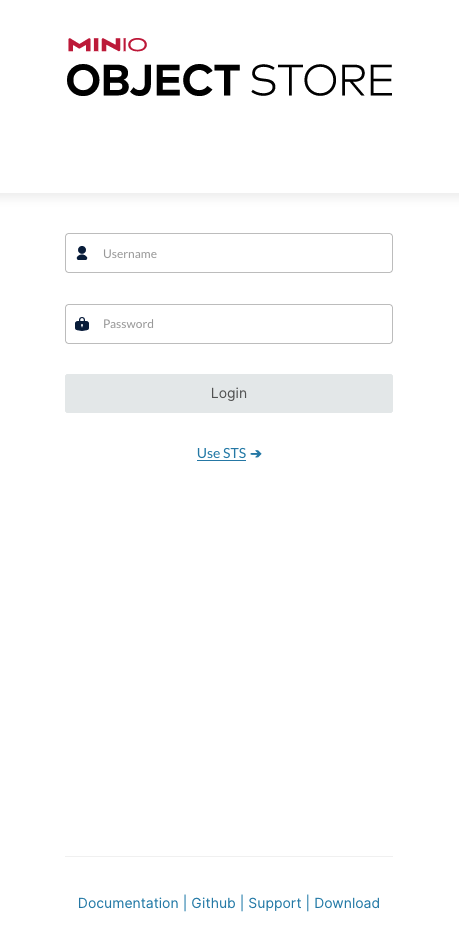
您可以使用 MinIO 控制台进行一般管理任务,如身份和访问管理、指标和日志监控或服务器配置。每个 MinIO 服务器都包含其自己的嵌入式 MinIO 控制台。